Smart Locks vs. Traditional Deadbolts: Which Is Better?
By Netta Kaiden · Sep 9, 2025 · 5 min read
When choosing a lock for your home or business, two common options are smart locks and traditional deadbolts. Each offers its own set of features, and the right choice depends on your goals for security, convenience, and control.
Smart locks use electronic systems and connect to mobile apps or keypads. Traditional deadbolts use physical keys and mechanical hardware. Both can protect your doors, but they work in very different ways.
Understanding how these locks differ helps you decide what fits best for your entry doors, rental properties, or business locations.
How Smart Locks Work
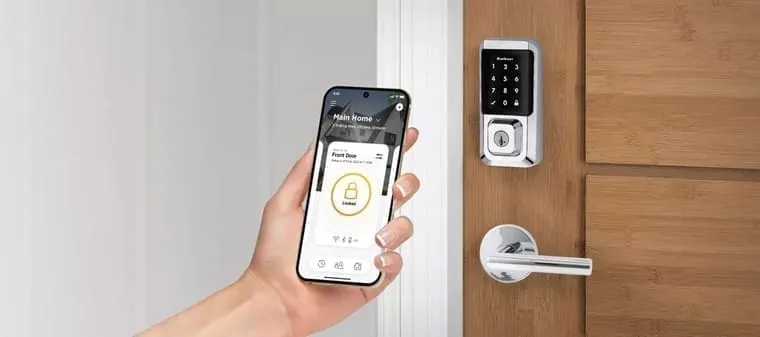
Smart locks use electronic mechanisms to control entry. Most models connect to a smartphone app, keypad, or Bluetooth device. Some allow remote access from anywhere through Wi-Fi.
Many smart locks support features like keyless entry, activity logs, or temporary access codes for guests. Some also work with voice assistants or home security systems. You can open the door with a phone, code, or backup key.
Common types of smart locks include:
- Keypad locks that require a PIN to unlock
- Bluetooth locks that connect to your phone when nearby
- Wi-Fi-enabled locks with app access from anywhere
Smart locks need power to operate. Most use AA batteries or built-in rechargeable batteries. Some models send alerts when the battery is low, so you know when to replace it.
How Traditional Deadbolts Work
Traditional deadbolts use a physical key to engage or release a steel bolt. This bolt slides into a metal strike plate in the doorframe, keeping the door closed and secure. These locks do not use electronics.
Most homes and apartments use single-cylinder deadbolts, which operate with a key from the outside and a thumb-turn from the inside. Double-cylinder deadbolts use keys on both sides for added security.
Traditional deadbolts work with:
- Standard house keys
- High-security keys that are harder to copy
- Mechanical parts that do not rely on batteries or apps
These locks are durable and simple. They require no internet, electricity, or phone app to use, which some homeowners prefer.
Comparing Security Features
Both lock types can provide strong security, but they protect in different ways. Traditional deadbolts depend on strong materials, proper installation, and resistance to force. Smart locks focus more on access control and entry tracking.
Smart locks allow you to see who enters and when. You can set unique codes for different users or set your door to lock automatically after a certain time. Some also send alerts if someone tampers with the lock.
Deadbolts offer strong physical resistance to forced entry when installed correctly. Many models use reinforced steel, anti-drill pins, or bump-resistant designs.
Neither lock type guarantees perfect protection. A strong door, frame, and strike plate also matter. Pairing physical strength with access control gives you more options to protect your property.
Convenience and Access
Smart locks make entry easier for people who prefer keyless systems. You can unlock your door remotely, share digital access with family or workers, and check if the door is locked without being there.
This can be helpful for Airbnb hosts, property managers, or families with children who often lose keys.
Traditional deadbolts require fewer components and no digital setup. You don’t have to worry about software issues, battery levels, or mobile apps. For some users, this makes them easier to trust.
Here’s a side-by-side look at convenience:
Smart locks: Remote access, keyless entry, user tracking, customizable codes
Deadbolts: No setup, no apps, reliable use with a physical key
Choose what fits your comfort level with technology and how you prefer to manage entry.
Cost and Maintenance
Smart locks usually cost more up front. Prices range depending on the features. You may also need Wi-Fi bridges, hubs, or extra hardware for certain functions.
These locks require battery changes every few months or a year, depending on usage. If something fails, parts may be harder to repair without support from the manufacturer.
Traditional deadbolts cost less and have fewer parts to manage. A basic deadbolt costs less, while high-security models cost more. Once installed, they work with little to no upkeep for years.
Where Each Lock Works Best
Choosing between smart locks and deadbolts depends on your goals and location. Here are general recommendations:
- Use smart locks on rental properties, vacation homes, or high-traffic entryways where user access changes often.
- Use deadbolts on personal homes, storage rooms, or areas where mechanical strength matters more than remote access.
Both lock types can work together. For example, some smart locks fit over a standard deadbolt. This gives you tech features while keeping a traditional key option.
Get Lock Installation Help in Gainesville, FL
Choosing between smart locks and traditional deadbolts depends on your access needs, budget, and security goals. Whether you want digital features or prefer a mechanical key, installing the right lock helps protect your home or business. At Be Secure Locksmith, we install both smart and traditional lock systems for properties throughout Gainesville and nearby communities. Our team provides clear guidance, dependable service, and honest pricing. Contact us today to schedule a lock installation or ask about the best security option for your door.
- Transponder Key vs. Remote Head Key vs. Smart Key in Dunnellon, FL: What Your Car Actually Uses
- Moving to Gainesville, FL? Rekey Your Locks Before You Unpack
- Emergency Locksmith in Gainesville and Ocala, FL—What to Expect When You Call
- Why Ocala, FL Businesses Are Switching to IC Core Lock Systems
- How Gainesville, FL Homeowners Can Improve Front Door Security Without Major Renovations
Talk to a local locksmith today
Need a key made, a lockout solved, or new locks? Be Secure Locksmith is your local, mobile locksmith — contact us today or call now for fast, licensed service.